OSHA-ready safety, built on the same clock.
Report incidents from the floor in under a minute, build your OSHA logs automatically and know every machine's lockout status before anyone starts it. Hours worked come straight from time and attendance, so your TRIR and DART rates are always current.
- OSHA 300, 300A and 301
- 8- and 24-hour report alerts
- Lockout/tagout per 29 CFR 1910.147
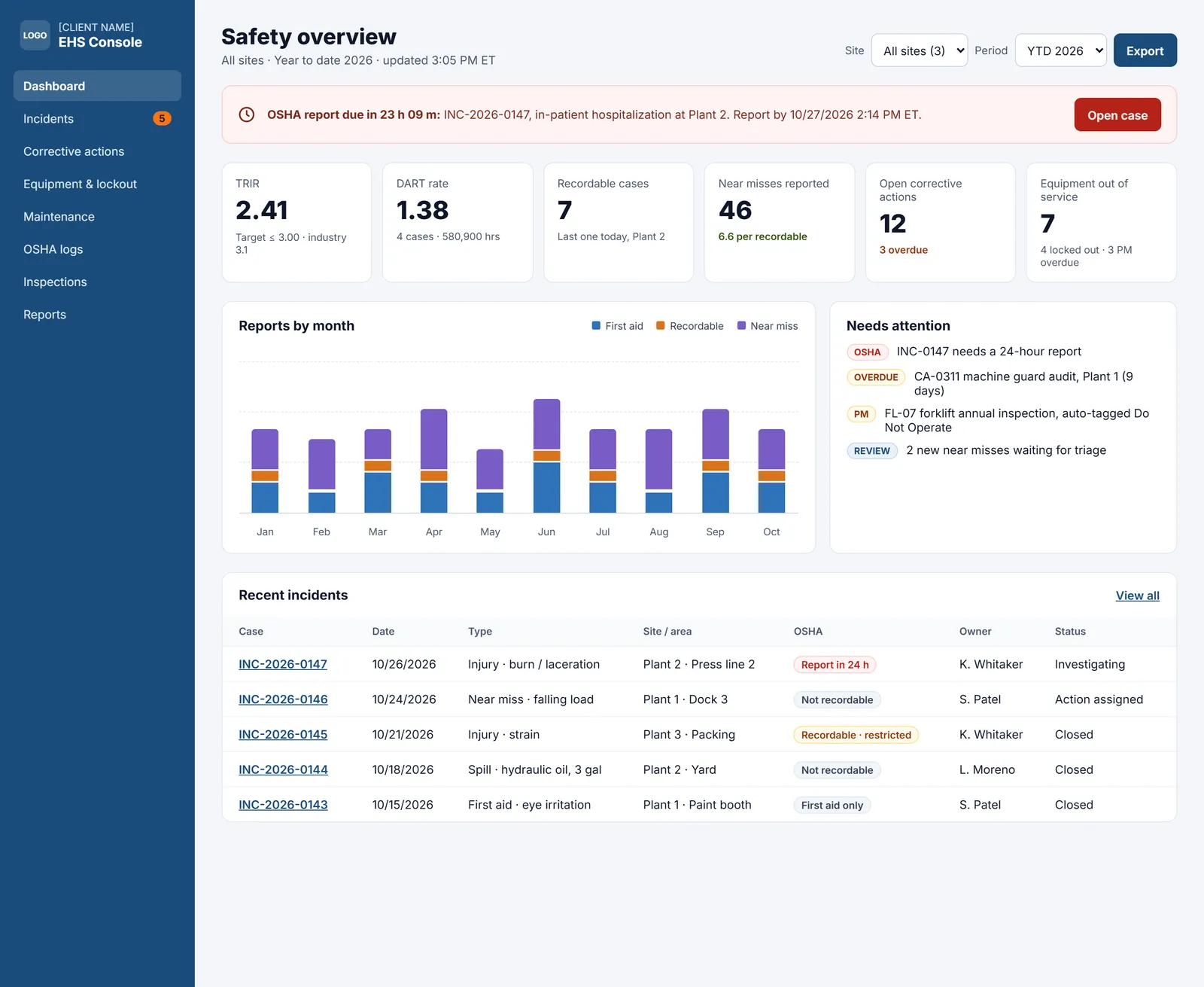
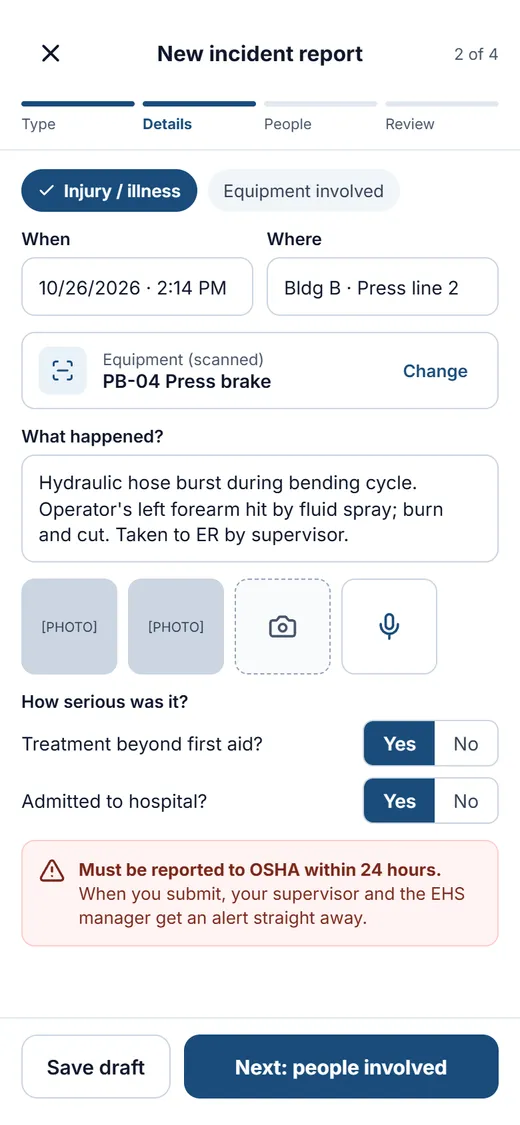
From near miss to closed case
Incident reporting from the floor
Scan the machine, add photos, answer two questions and submit. The app tells the reporter right away if OSHA needs a call.
Severe-injury deadline alerts
Fatalities start an 8-hour countdown. In-patient hospitalizations, amputations and loss of an eye start a 24-hour countdown, with alerts to the EHS manager.
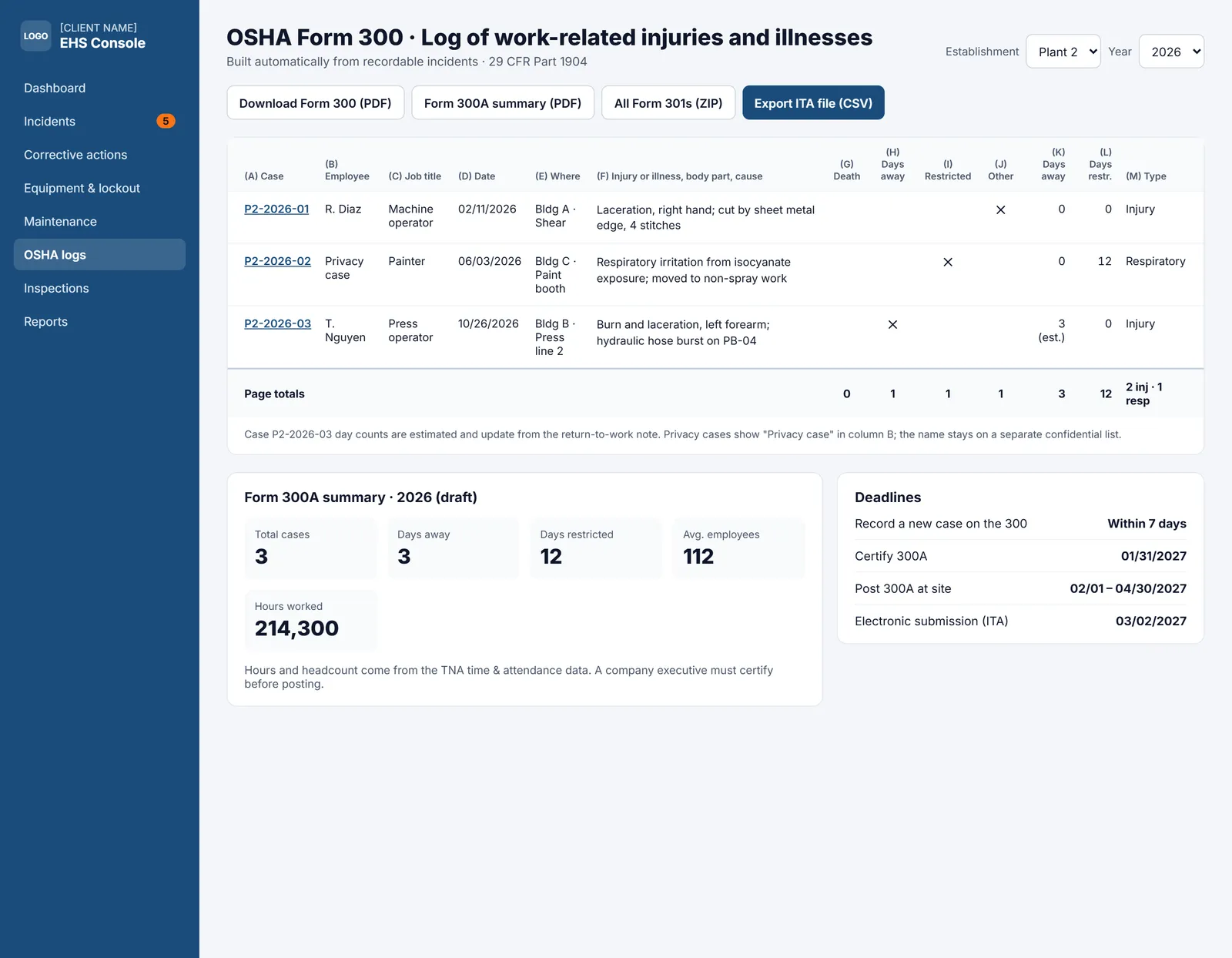
OSHA 300, 300A and 301
Recordable cases build your logs per establishment, with privacy-case handling and a CSV ready for electronic submission through OSHA's ITA.
Equipment and lockout/tagout
QR-tagged assets show live lockout status, energy isolation points and who holds each lock. Overdue safety-critical PMs block operation.
Investigations and corrective actions
One case file for the investigation, root cause and corrective actions, with owners and due dates.
Inspections and rates
Scheduled inspections and pre-use checks, plus TRIR and DART rates by site using real hours worked from the time clock.
Your logs, done as you go.
Classify a case once and TNA-USA keeps the Form 300 log, the 300A annual summary and the 301 incident report in step, establishment by establishment.
-
✓
Days away and restricted daysTrack days away from work and days on restricted duty or job transfer for every recordable case.
-
✓
300A posting remindersGet reminded to certify the 300A and post it from February 1 to April 30.
-
✓
Five-year retentionLogs and case files are kept for the five years OSHA requires, and you can pull them up during an inspection.
Scan before you operate.
Operators scan the QR tag on any machine to see whether it is locked out, which energy sources are isolated and when the next preventive maintenance is due.
-
✓
Do-not-operate statusA failed pre-use check or an open lockout marks the machine do-not-operate until it is cleared.
-
✓
Lock ownershipOnly the person who placed a lock can remove it, and every lock and removal is recorded.
-
✓
Work orders to return-to-serviceMaintenance logs the repair on a work order and signs the machine back into service.
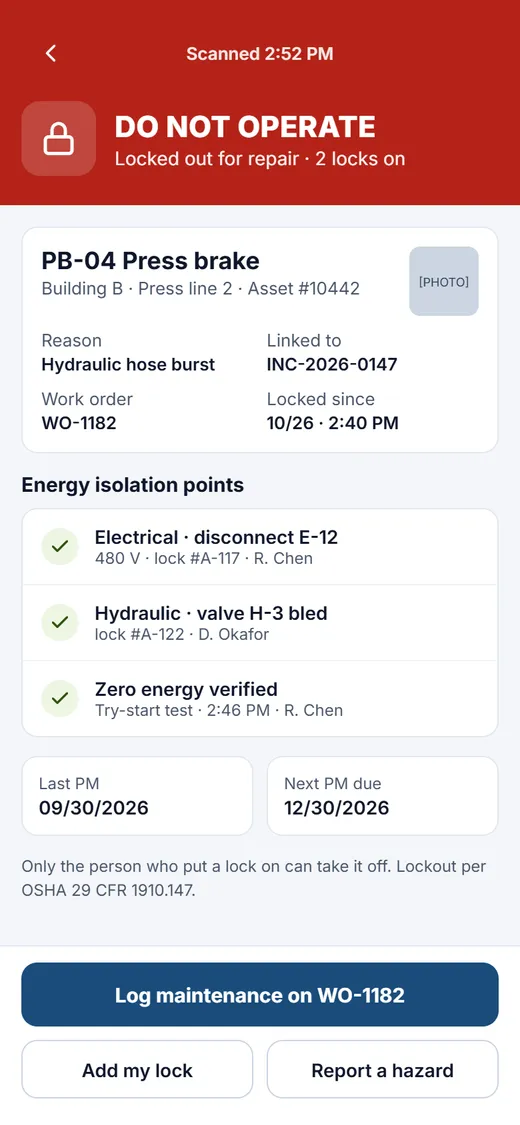
Scan before you operateOperators see lockout status, energy isolation points and the next PM date before they start.
TNA-USA provides tools that support compliance programs. It does not provide legal advice. Requirements vary by state and municipality, so please confirm your obligations with qualified counsel.
Frequently asked questions
Which employers have to keep OSHA injury and illness logs?
Employers with more than 10 employees at any time during the previous calendar year generally must keep OSHA 300, 300A and 301 records, unless their industry is on OSHA's partially exempt list. Records are kept per establishment and retained for five years.
When do we have to report a severe injury to OSHA?
A work-related fatality must be reported within 8 hours. An in-patient hospitalization, amputation or loss of an eye must be reported within 24 hours. TNA-USA starts a countdown and alerts your EHS manager as soon as the incident is reported.
Can TNA-USA help with OSHA electronic submission?
Yes. TNA-USA produces a CSV in the format OSHA's Injury Tracking Application (ITA) accepts, for establishments that must submit electronically by March 2 each year.
How are TRIR and DART rates calculated?
TRIR is the number of recordable cases multiplied by 200,000, divided by total hours worked. DART uses the cases with days away, restricted duty or job transfer. TNA-USA uses actual hours worked from time and attendance, so the rates are current.
Does it support lockout/tagout?
Yes. Each asset has a QR tag that shows its lockout status, energy isolation points and lock holders, in line with OSHA's control of hazardous energy standard (29 CFR 1910.147).
Works with the rest of the platform
Every module shares one employee record, one set of time clocks and one login.
See it running on your own operation.
Book a 30-minute walkthrough with our team. We will show you the modules that matter to you, using your sites, shifts and state rules.